
Apeaksoft iPhone Transfer is a reliable tool for managing content on your iPhone, iPad, or iPod. With this Windows app, you can transfer photos, contacts, media, SMS, and more from your iOS device to iTunes or a directory on your system, and vice versa.
Many iOS users find iTunes cumbersome and want a more user-friendly solution for managing their device's data. Several solutions exist, and iPhone Transfer One such tool is. It aims to make it easier to transfer files between an iOS device and your PC or your iTunes library.4
The application can handle not only iPhonesAs the name suggests, but also iPods and iPads. To sync your device all you have to do is connect it to your PC, wait a few seconds for the app to scan it, and then start viewing the objects it finds.
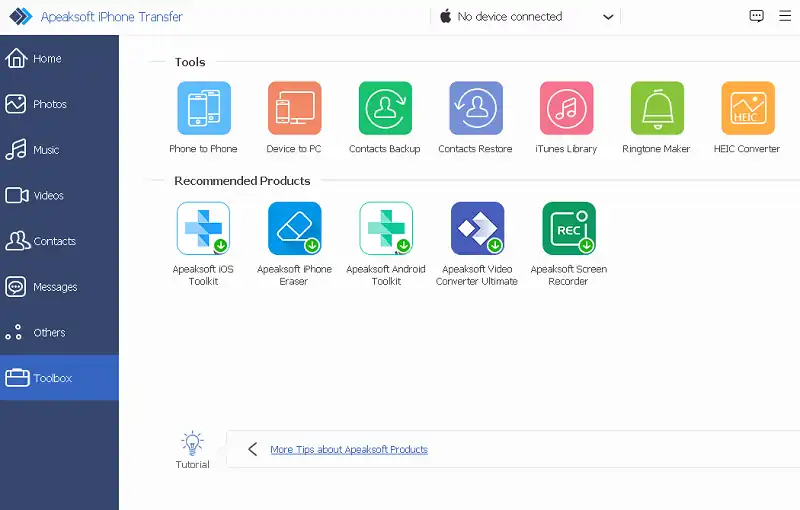
Scanned files are organized into the following groups: media, playlists, photos, books, contacts, and SMS. Some of these groups contain smaller groups. Regardless of what you want to export, the program lets you choose any directory on your system as the output location. It also lets you copy files to your iTunes library, so you always have a backup.
The app can also import files, so that your iOS device has all the information you need. Plus, iPhone Transfer can look for duplicate contacts so that your iOS device doesn't store unnecessary files. This program can also help you transfer data from one iOS device to another, which is another reason why it can be a great companion.
Apeaksoft iPhone Transfer Features:
- Transfer iOS data between PC and iOS devices without losing any data.
- Easily manage and modify contacts, pictures, music, etc. on iOS devices.
- Backup files, such as contacts, between iOS device and pc.
- With just one click you can sync files across PC, iTunes, and iOS devices.
- Convert HEIC images and make ringtones with music.
- Support for the latest iOS devices and iOS versions.
- Support multi-terminal transfer and multi-device transfer.
Get Apeaksoft iPhone Transfer for free:
go here Gifts page:https://www.apeaksoft.com/special/
Fill out the short form by entering your name and email address and click the “Get It Now” button.
Next, check your email inbox for an email from Apeaksoft (registration@apeaksoft.com). This email provides activation information or a license code.

Download the iPhone Transfer software from this link: https://downloads.apeaksoft.com/
Install and launch the software, enter your email address and registration code upon activation.
Press the “Activate” button.
.


![Wise Registry Cleaner Pro v11 Free for 1 Year [Worth $29.95] | Free Download](https://diystorehouse.com/wp-content/uploads/2024/06/Wise-Registry-Cleaner-Pro-Box.png?v=1719554291)
