

ASCOMP Cleaning Suite Pro is a Windows tuning and cleaning software. This software has 6 different tools that can help you clean up unnecessary data and make your computer run faster.
Usually the professional version costs around USD 19.9 (Personal License), but in today’s promo, you can get the pro version at no cost or for free.
Visit this new Gifts Page or this Gifts page.
Enter your first and last name, and email address, select your country, and click “Send” button.
Within a few seconds, you will receive a confirmation email from ASCOMP Software, check your email inbox.
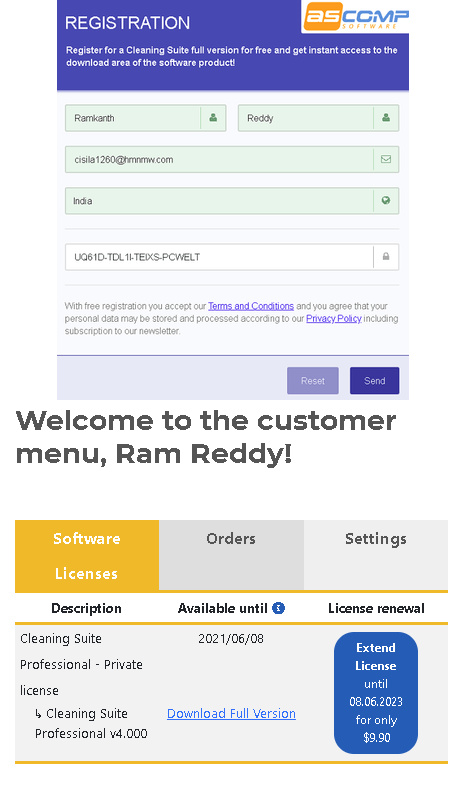
Note: If you haven’t received a confirmation email, check your email junk box or spam folder.
Click the confirmation link. This link takes you to your ASCOMP account page, where you can download the full version installer.
If you have an ASCOMP software account, sign in to it by going to ascompsoftware.com/login/Simply type in your customer number and password.
On that webpage, click “download full version” Visit the link and download the installer.
Run the pre-activated or full-version installer, and complete the installation process.
That’s it, enjoy 1 year of free subscription of Cleaning Suite Pro.
About ASCOMP Cleaning Suite Pro:
If your computer starts up slowly and your hard drive is full, it’s time to clean it up!
But how can you know which data is safe to delete and which data we need for computers and programs to function properly?
Cleaning Suite has the answer!
Six assistants analyze your system and enable deep cleaning operations. For example, you can delete temporary files, clear browser history, cache, and cookies from all popular Internet browsers, and prevent installed applications and tools from starting automatically at system startup.
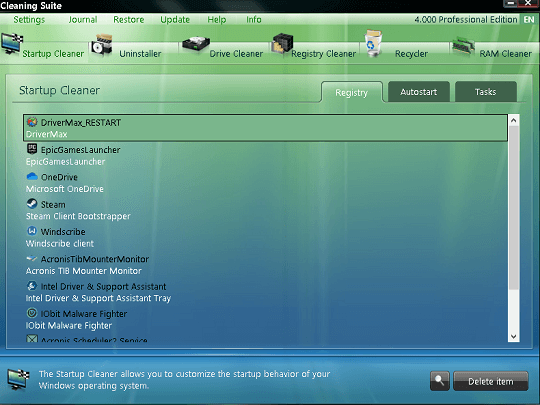
The cleaning suite can also optimize the Windows registry in a targeted manner.
it Windows The software proceeds very carefully to ensure unrestricted use of your computer even after the cleaning process. In addition, the cleaning suite provides advanced features for the Windows Recycle Bin.
The Restore Center provides the ability to undo certain actions of the software at any time. The detailed journal also provides information about the entire cleaning history.


![Wise Registry Cleaner Pro v11 Free for 1 Year [Worth $29.95] | Free Download](https://diystorehouse.com/wp-content/uploads/2024/06/Wise-Registry-Cleaner-Pro-Box.png?v=1719554291)
