
Duplicate Photo Finder Plus It is a handy and reliable piece of software designed to detect and eliminate duplicate photos on your hard disk based on their content, independent of output format, file size or location.
This simple, all-in-one tool can remove duplicate images and free up space on hard drives.
Given that temporary files are the primary source of your low disk space, duplicate files and directories can also be a contributing factor. If you don’t use special software that helps you delete such files, you will spend hours finding them, which is where Duplicate Photo Finder Plus is useful.
It can search all drives or specific folders to find duplicate pictures and make it easy to get rid of them.
Due to its built-in comparison technology, it identifies duplicates photos Based on their content rather than their size, name or last modification date. Therefore, you can be assured that the results will be accurate.

You can see that it is easy to use. Just click the Find Now button to find it quickly duplicate files. Just before searching, you can adjust the resource, size and type parameters. After that, you can use the toolbar button or context menu item for checked duplicate files or highlighted files to perform the action.
Duplicate Photo Finder Plus Features:
- Really finds duplicate files, regardless of file name or modification time, because only the content is compared.
- Built-in high-speed comparison algorithm.
- The software offers smart selection and various methods for multiple checks.
- The software is extremely user-friendly, requiring only one click to get results.
- Flexible scanning conditions: You can specify drives, folders and files to scan.
- Reusable results: Save/load list of duplicate files.
- Helpful options: smart selection, comparison algorithm, subfolders, etc.
- Supported operating systems are Windows 11/10/8/8.1/7/Vista and Windows XP.
Get Duplicate Photo Finder Plus for free:
go to Gift Page.
On the giveaway page, you can view the license key, and copy the code.
download software from Developer page.
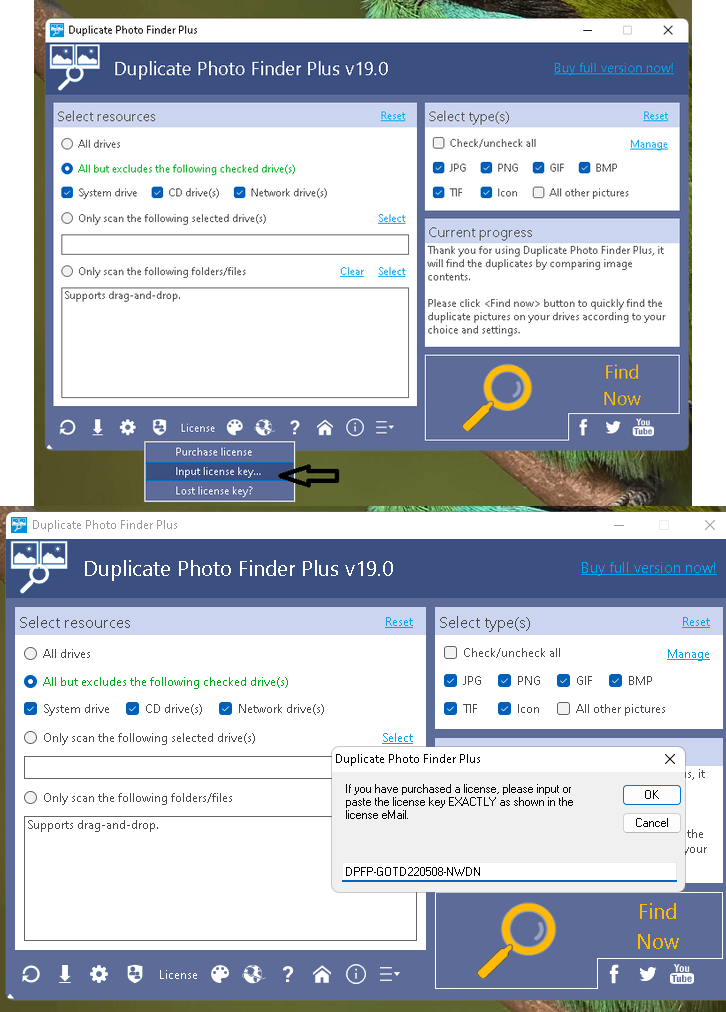
Install the software, launch the app and click the “License” menu on the main window.
Next, click “Input License Key”.
Enter the license code below and click the “OK” button.
Connected
Learn more from Techno360
Subscribe to get the latest posts delivered to your email.


![Wise Registry Cleaner Pro v11 Free for 1 Year [Worth $29.95] | Free Download](https://diystorehouse.com/wp-content/uploads/2024/06/Wise-Registry-Cleaner-Pro-Box.png?v=1719554291)
