
Faster Screen Recorder Is Windows Software that allows you to record what you see on your computer screen, which can be helpful for documenting meetings, video tutorials, and other events.
With this great and easy to use app you can record everything that happens on your screen. It only takes a few minutes to set it up. Now more than ever, practically everyone can get involved in the hobby of making videos that anyone can watch online. It's easier than ever to tell people about your hobby or advice. If you have the hardware, it's not hard to get the software.
With Fast Screen Recorder, you can record everything that happens on your computer screen, including sound. Screen Recorder It lives up to its name by making the whole unit quick and efficient. The user interface is unobtrusive and minimal.
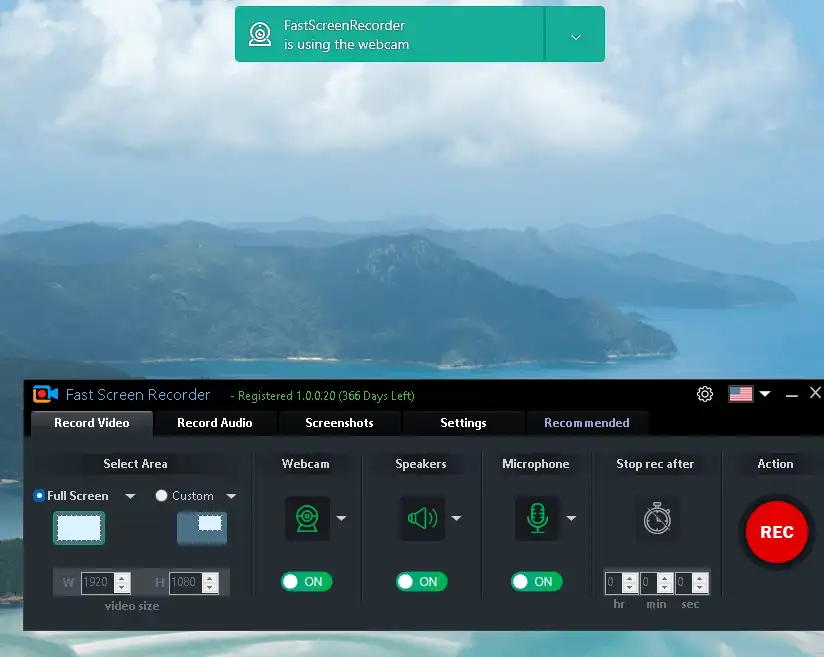
You can choose between video, audio, and screenshot capture using the toolbar. You can start recording at any time by pressing the big REC button.
If you already know what you're doing, the time spent planning a video recording will be minimal. The recorder area is the first thing to notice. You have the option to go full screen or create a box of a specific size.
Moving forward, all you have to do is manage the switches. Turn on the webcam feature if you want to participate visually. Thankswise, the speakers and microphone. Time flies when you're having fun, so don't try to keep track of it. Turning on the automatic timer will help you keep your recording to a reasonable length. After the allotted time has passed, the recording will automatically end and be saved.
Fast Screen Recorder Features:
- Record any screen area.
- Record video with a microphone
- Record audio only
- Set auto stop recording
- Record screen without watermark
- Auto video optimization
- Disable recording mouse activity
- Capture full or window or custom screenshots
Get Free Fast Screen Recorder:
go here Gifts Page,
Enter your email address and click the “Next” button.
Check your email inbox for an email from FastPC Tools (support@fastpctools.com). This email provides the license key and a link to download the software.
Download the software from here Here
Install the software, launch it, and click “Continue Trail.”
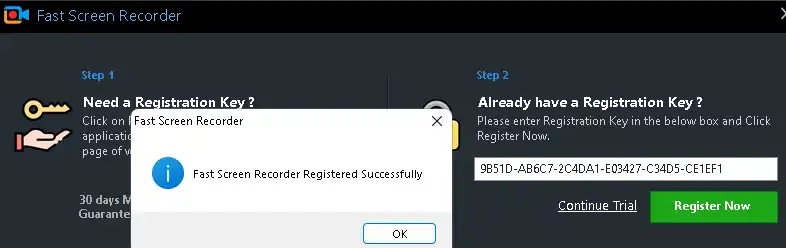
On the main window of the app, click on “Register”.
Enter the license key and press the “Register” button.
That’s it.


![Wise Registry Cleaner Pro v11 Free for 1 Year [Worth $29.95] | Free Download](https://diystorehouse.com/wp-content/uploads/2024/06/Wise-Registry-Cleaner-Pro-Box.png?v=1719554291)
