
Coolmuster PDF to Word Converter Makes it easy to convert PDFs into editable Word documents, so you can make changes with ease.
Coolmuster is celebrating its incredible converter by offering a special free one-year license.
About CoolMaster PDF to Word Converter:
Converting files is still an important part of many tasks and activities that involve transferring digital data. It applies to various fields and situations. For example, when working with documents, we often need to convert them before printing.
Coolmuster PDF to Word Converter can help with this. It allows you to convert multiple PDF documents Microsoft Word Format all at once, and you can choose which pages to convert.
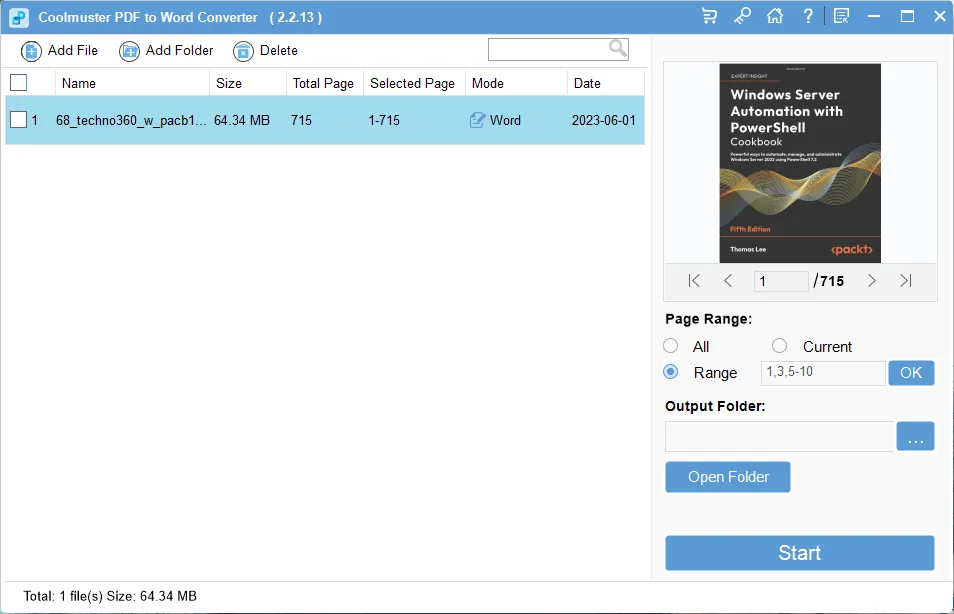
A straightforward data-in, data-out operation:
Documents can be added to the processing queue in two ways: by selecting individual files or by selecting entire folders. If you have multiple files to convert, you can do it more efficiently because of batch processing.
Change page categories and choose a destination folder to convert:
The key flexibility-enhancing feature of CoolMaster PDF to Word Converter is its page range selector, which lets you easily choose which pages to convert.
With the ability to choose an output directory for processed files and a preferred page range, you can accomplish tailored, more effective processing.
key features :
- Easy PDF to Word Export: Microsoft Word is easier to edit than Adobe PDF files. With this converter you can convert PDF to Word document in one click. Then, you can edit text, add images, and more.
- Batch and partial conversion: You can convert specific pages or up to 200 PDFs at once. This saves time and effort.
- Preview before converting: Built-in viewer lets you preview any PDF before converting. This helps you find the pages you want to change.
- Original layout and format: The new document will look exactly like the original, with the same text style, images, graphics, tables, links, layout, and formatting.
- Easy to use: You can manage your PDF by deleting, clearing, selecting or moving. With one click, you can convert files and see the results instantly.
- Works with Windows 11,10,8 and 7.
Coolmuster PDF to Word Converter Giveaway:
visit this coolmuster gift page,
Provide your name, email address, captcha code and click on “Submit” button.
Upon successful submission the giveaway page will immediately present you with the specified license code. Copy this.
Download PDF to Word Converter installer from here: https://www.coolmuster.com/downloads/cool-pdf2word.exe
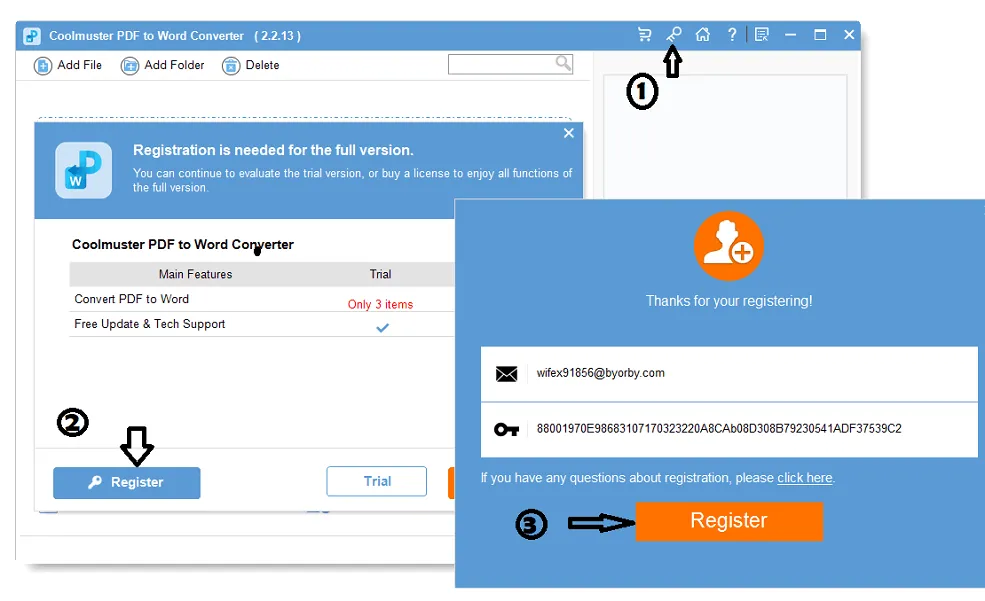
Install and launch the software. Click the “Key” icon at the top right on the main menu of the app.
A next window will appear. Please proceed by clicking on the “Register” option, which will prompt another window to be displayed.
Within this window, please enter the activation information (registered email address and license code), and complete the process by clicking the “Register” button.


![Wise Registry Cleaner Pro v11 Free for 1 Year [Worth $29.95] | Free Download](https://diystorehouse.com/wp-content/uploads/2024/06/Wise-Registry-Cleaner-Pro-Box.png?v=1719554291)
