

NetOptimizer A useful tool for Windows that increases your Internet speed and cleans up your browser.
If your internet speed is slower than usual, consider using the NetOptimizer app before upgrading your hardware.
Net Optimizer Gifts:
Today SOS Website is offering a free full version license for Net Optimizer.
To receive your license code, follow these steps:
- go here Gifts Page and click “I don’t use Facebook, Twitter, or LinkedIn.”
-
Fill out a small form by entering your email address (twice) and other required details and click on the “Give it to me now” button.
Note: To avoid spam, use a temporary email address such as temp-mail.org.
3. The license code will display on the gift page, just copy the license code.
- Download the software from here Developer page.
- Run the installer and complete the installation.
- Open the app and click on the “Activate Now” button.
- Enter your email address and license code and press the “Submit” button.
That’s it!

Understanding NetOptimizer
It is a sophisticated network optimization tool that analyzes, prioritizes, and streamlines network traffic for increased efficiency and reliability.
Using advanced algorithms and machine learning, it minimizes latency, reduces packet loss, and optimizes bandwidth usage, ensuring a better user experience.
How does this work?
This advanced network optimization tool is designed to speed up and optimize the Internet connection on your computer, whether you’re connected via cable, Wi-Fi or mobile broadband. It works by automatically adjusting your connection and browser settings for optimal speed.
Here’s how it works:
Connection type and OS parameters:
NetOptimizer quickly checks your Internet connection type and your operating system parameters to determine if any adjustments need to be made.
Optimizing Windows Settings:
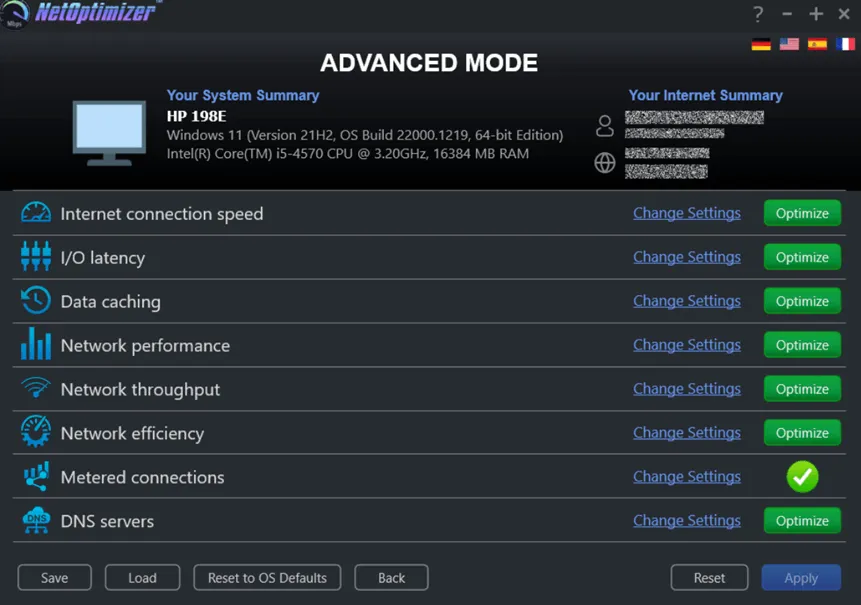
Fixes hidden Windows network settings, such as TCP settings, TTL, I/O parameters, and network efficiency.
browser settings:
This tool automatically applies optimal settings to all your browsers, ensuring that they function consistently and efficiently.
Clearing the Junk:
Cleans up internet junk to prevent slow browsing and blocking your system.
DNS Optimization:
Fastest search and connection DNS Configuring servers based on your location and network, improving web surfing speed and reducing latency.
key features:
user-friendly interface
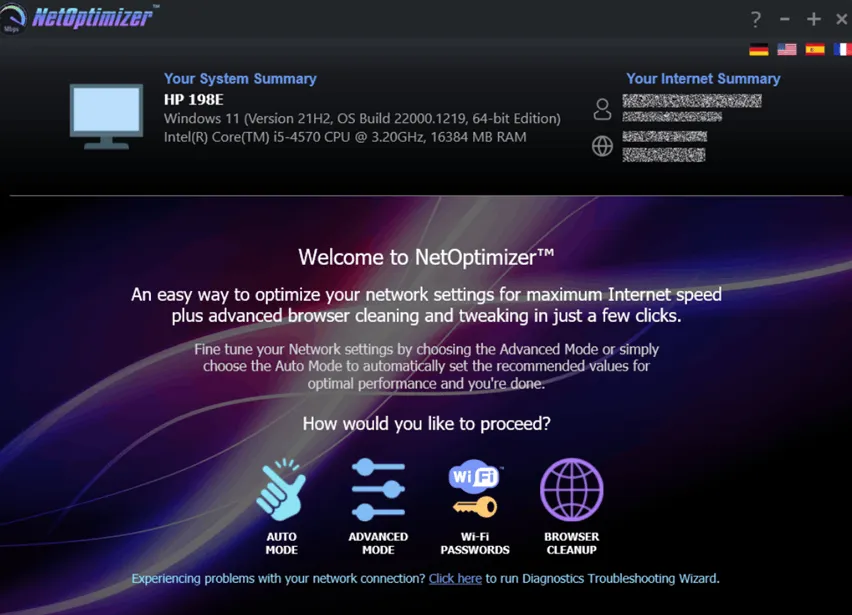
This app has a simple graphic user interface (GUI) designed for easy use by everyone. It gives you key information about your computer, such as OS version, processor, RAM, computer name, and IP.
Customizable Mode
If you are not a tech whiz, choose Auto mode. It checks it for you PCInternet speed, I/O latency, data caching, network performance, throughput and efficiency. Once this is done, your performance improves automatically, no input required.
Or, use Advanced mode to change the settings manually. Advanced users can change specific parameters by entering their preferred values.
browser cleanup
NetOptimizer makes it quick and easy to delete browser cookies, history, cache, passwords, and form data. It works for installed browsers (Edge, ChromeFirefox, Opera, Brave and Internet Explorer) and lets you easily manage their data.
conclusion:
NetOptimizer is a valuable tool for those who want a faster web connection without much technical knowledge. With its simple interface, you can have full control over modifying network settings on your machine.
To know more about this Windows tool please visit here Ddeveloper’s page,


![Wise Registry Cleaner Pro v11 Free for 1 Year [Worth $29.95] | Free Download](https://diystorehouse.com/wp-content/uploads/2024/06/Wise-Registry-Cleaner-Pro-Box.png?v=1719554291)
