
iDownerGo is a Windows/Mac application that enables you to download videos, music, and playlists from 10,000+ websites, allowing you to create an offline media library.
For a limited period, you can get a free 6-month license of this software worth $39.95.
iDownerGo Giveaway:
go to Gift Page.
Next, select “Windows or Mac.” Enter your email address, click the “Get License” button, and finally press the “Confirm” button by entering the captcha in the pop-up box.
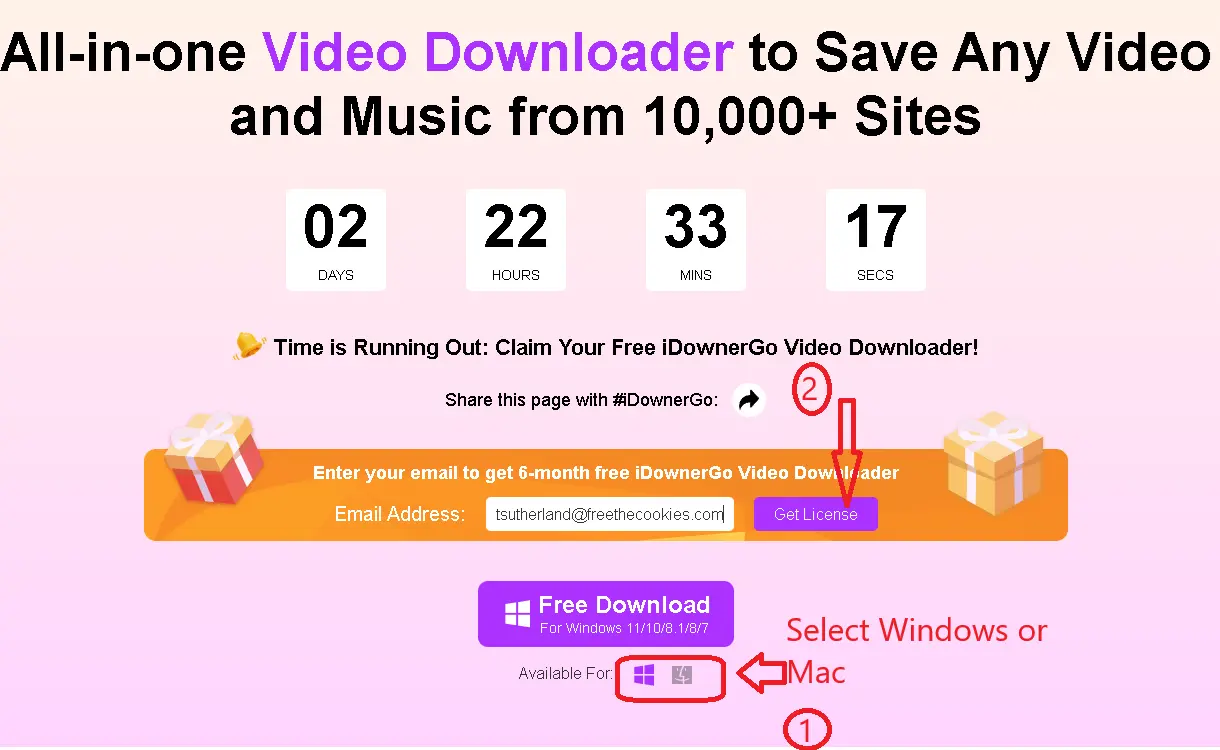
You should have received an email from iDownerGo with a link to download the software and a licensing code.
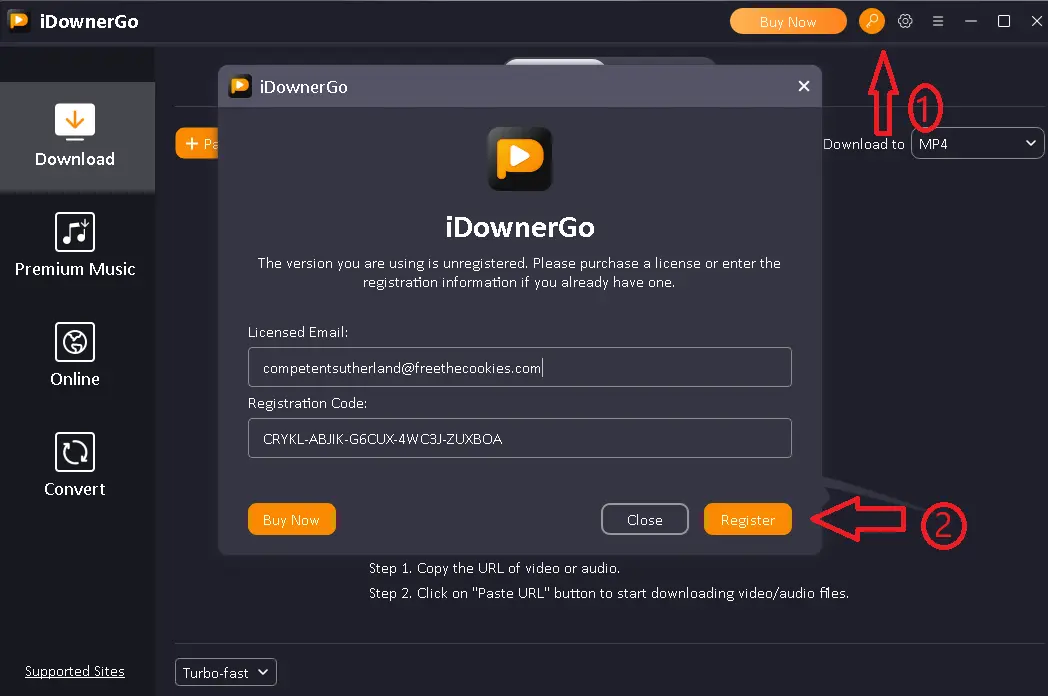
Start the program after installation. In the main window, find the “Key” icon. Click on it. In the next box, enter your email address and the license number you received. Finally, click on “Register”.
About this iDownergo:
Although many streaming services simplify access to music and movies with a single click, some users still choose to save their favorites locally so that they can listen to them whenever they want, even when they do not have internet.
Here, a media downloader like iDownerGo proves useful as it enables seamless and quick downloading of multimedia files from over 10,000 websites like widely popular ones. youtubeDailymotion, Vimeo, Spotify, and even social media platforms like Facebook, TikTok, X, and Instagram.
video DownloaderThe primary window displays simple instructions, making the user interface more intuitive. To download a video or music file using iDownerGo, simply copy and paste its URL. To make copying download URLs easier, we've enabled clipboard monitoring.
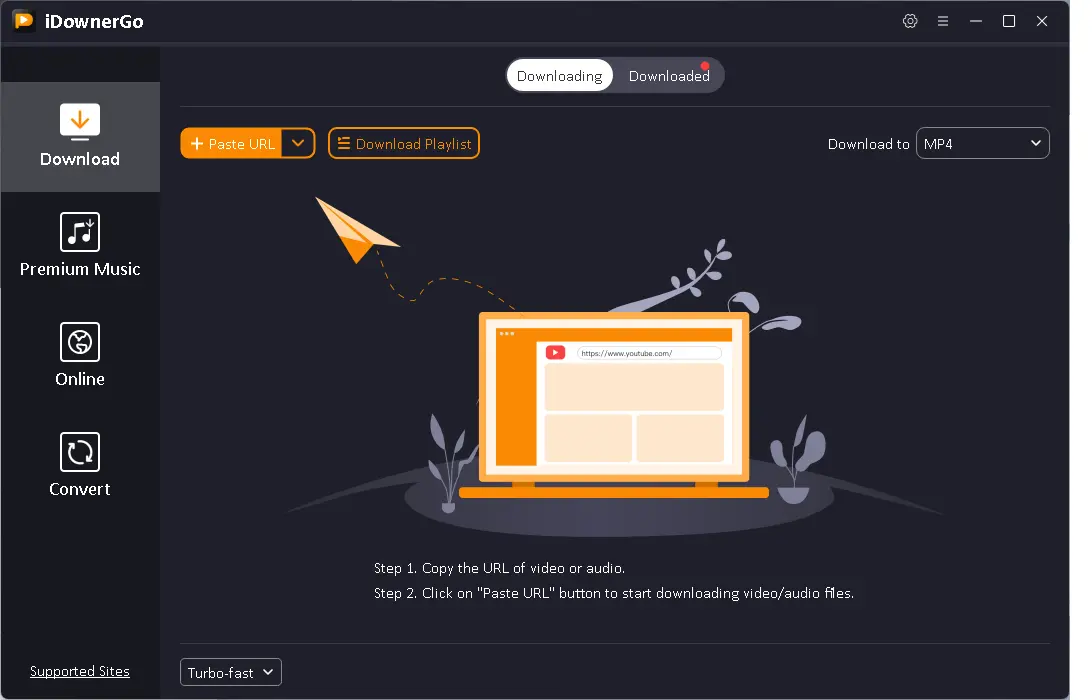
The software automatically optimizes captured videos for maximum compatibility with iOS and Android devices, and it supports a variety of common formats including MP4, AVI. mkvFLV, 3GP, WMV, MOV, and HEVC MKV/MP4.
The subtitles and songs of the video will be downloaded automatically. You can also store audio tracks in a variety of formats, including MP3, AAC, MKA, FLAC, M4A, WAV, OGG, and AIFF.
You can view the list of downloaded files and track their progress in real time. Once the task is complete, you can configure the app to sleep or turn off the computer.
key features
- Download audio and video in high definition or 4K Quality from over 10,000 websites using this robust video downloader tool.
- Downloading an entire YouTube channel or playlist is as simple as clicking a button with this useful tool.
- You can also choose to convert media files to other high quality formats, such as 320Kbps MP3, HD MP4 and Original.
- The app interface is straightforward, and it supports bulk download of media assets (audio and video included).
- A built-in browser makes it easy to watch movies and listen to music, share links, and download videos from websites.
- This one-stop app allows you to download multiple files at once, saving a lot of time.
conclusion:
IDownerGo enables you to convert music and video to the most popular formats and download web content with minimal quality loss. Not only is it quick and easy to use, but it also has an integrated web browser, so you can search for music without leaving the app.


![Wise Registry Cleaner Pro v11 Free for 1 Year [Worth $29.95] | Free Download](https://diystorehouse.com/wp-content/uploads/2024/06/Wise-Registry-Cleaner-Pro-Box.png?v=1719554291)
