
Tipard All Music Converter It is a feature-rich software that allows converting the format of audio files into multiple formats such as MP3, M4A, FLAC, WMA, WAV, AAC, and more. However, it can also extract and save the audio stream from video clips using the above-mentioned extensions.
Thanks to the developer TipardYou can get a $15 license of this software for free for a limited time.
Tipard All Music Converter Giveaway:
Visit this gift page: https://www.tipard.de/blog/za_chip_p4puyrnq/,
NOTE: The gift page will be in German so Google translate will be necessary.
Enter your name and email address, confirm your agreement with their privacy policy, and enter the reCAPTCHA before clicking the “Submit” button to complete the short form.
You will soon receive an email from Tipard (aktion@tipard-support.de). When you open the confirmation link in a new tab, you will see a second email from Tipard. This email contains the registration code.
Download the installer from here https://www.tipard.de/downloads/musik-converter.exe,
Although the installation is in German, we can quickly change the interface language to English later. So no need to worry.
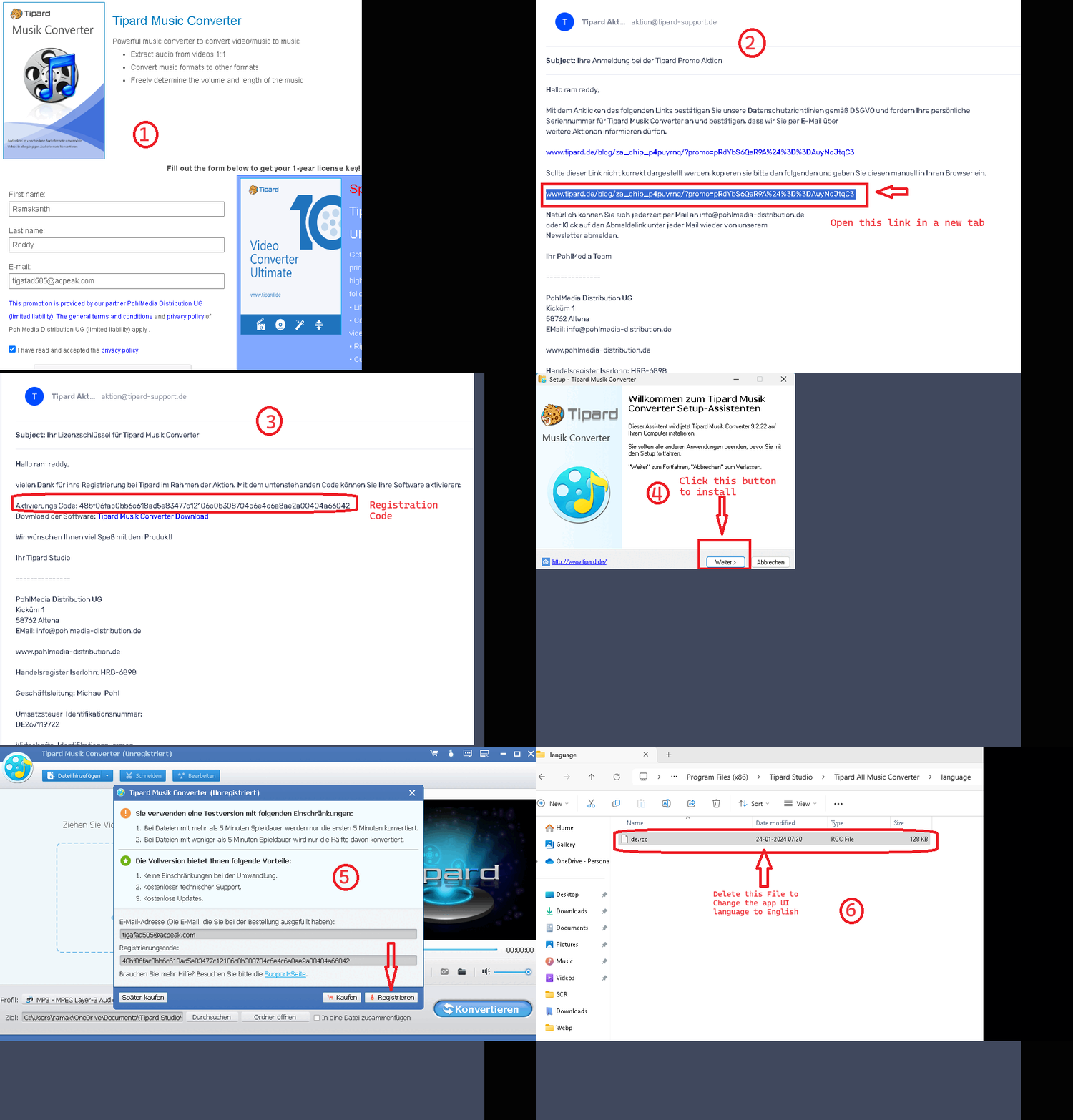
Launch the installer and select the “Weiter” button to set everything up.
After installation, a pop-up like the screenshot above will appear for activation. After entering your email and registration code, click on the “Register” button. Please exit the program.
Switch to English language:
After installing the software, go to the installation folder and find the language folder. Once there, delete the “de.rcc” file.
For example:
For 32-bit versions of Windows: C:Program Files Tipard StudioTipard All Music ConverterlanguageFor 64-bit versions of Windows: C:Program Files (x86) Tipard Studio Tipard All Music Converterlanguage
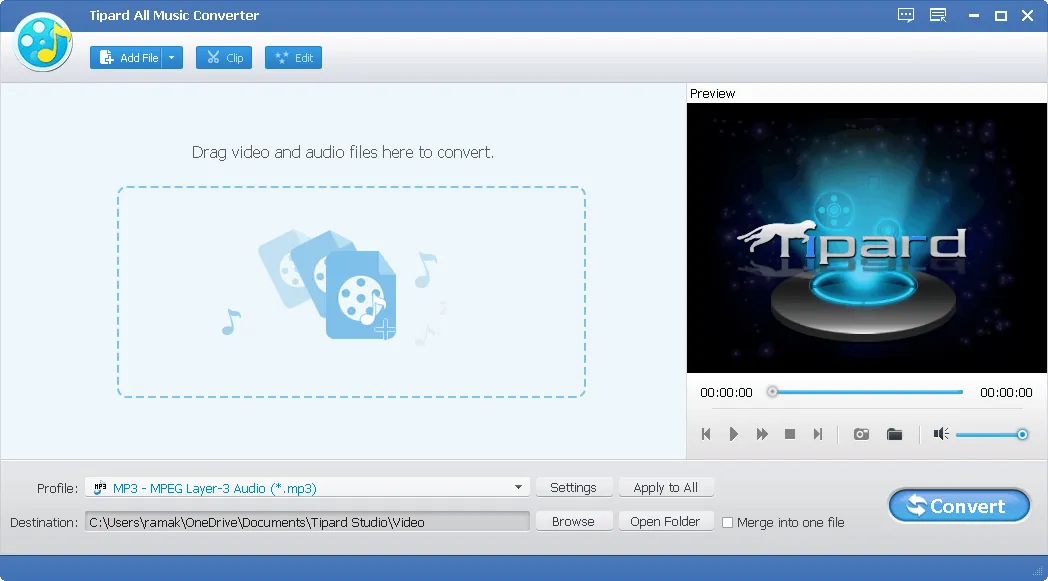
After removal “D.R.C.C.” After opening the file, launch the Tipard All Music Converter app to see the English user interface.
About Tipard All Music Converter:
With this robust program, you can convert videos and songs into any type of format. Audio Format. It has a converter that allows you to change the format of your audio files to MP3, WAV, and WMA, among many others.
Moreover, it has lightning-fast audio conversion capabilities, so you can easily extract music from Spotify, local MP4 videos, or web videos you downloaded. Plus, you can adjust the playback time and volume of your favorite music.
Using the Trim tool, you can choose the exact duration of the song you want to convert. Also, you can use the Effect tool to customize the volume level as per your preference. Batch conversion allows you to convert an unlimited number of audio files.
key features:
- Convert audio files to many popular formats quickly and easily. It covers more than just that mp3WAV, WMA, M4A, FLAC, and ALAC.
- You can easily extract audio tracks from videos, be they movies, music videos or anything else.
- Split a long audio file into smaller pieces or merge multiple audio files into one.
- Get the most out of your audio by adjusting the channel, bitrate, and sampling rate.
- Cut out the unnecessary parts and adjust the volume as you like.
- A built-in media player lets you preview the video, take frames, combine multiple pieces into one, and cut them into smaller parts.
- Using the Snapshot function, you can record and save the picture of your most precious moments.
- Batch convert all audio files.
- It is compatible with a wide range of devices, including iTunes, iPhone, iPod, iPad, Samsung, and other Android devices.
- Audio converted or edited with this app works with many devices, including Samsung, iOS, and Android smartphones and tablets, as well as many Apple products.


![Wise Registry Cleaner Pro v11 Free for 1 Year [Worth $29.95] | Free Download](https://diystorehouse.com/wp-content/uploads/2024/06/Wise-Registry-Cleaner-Pro-Box.png?v=1719554291)
