
vsdc pro is a powerful, lightweight and user-friendly video editor for Windows users.
With this easy-to-use software, you can create, edit, and export videos. It has lots of powerful editing tools, as well as video capture and disc-burning options.
About this VSDC Pro:
It's likely that when you want to create complex videos or improve existing videos, you're looking for a simple app that can help you do so with as little hassle as possible. We can use VSDC video editor for these things.
To quickly retouch your footage or create a new movie, use this tool. It has a lot of powerful tools for masking, color correction, and motion tracking. Join the global community of over 5 million people who use VSDC and let your imagination run wild.
UI and Functionality:
To use the app's features, you first need to create a project. Then, you can choose the project type: blank, import your own images and videos, capture video, or capture your desktop screen.
When you import multimedia files it is also possible to choose the transition type that best suits your needs.

different from others video editorThis software lets you move and change the length and size of the files you choose until it satisfies you with the result. You can also create new scenes and add them to your project if you don't like what's already been added.
features:
The Motion Tracking feature allows you to analyze the trajectory of any moving object in the video, record it, and assign the same trajectory to any other object you add to the scene: image, text, or mask. . This means you can censor moving objects in videos, recreate memes and simply add stylish, dynamic captions.
Using this tool, you can synchronize any effect parameter with the sound of the beat. Apply it to create dynamic audio spectrums, beautiful music visualizations, text “dancing” to the beat, or any other musical animation you can imagine.
Use the power of artificial intelligence to turn your video into a piece of art.

Remove any unwanted colors from footage: quickly and precisely.
Pro version of VSDC Activates hardware acceleration by default. This means that complex effects processing, as well as project exporting, becomes significantly faster.
Create new compositions with clipping masks, inverted masks, and text masks.
Achieve dynamism by manually adjusting the intensity of the effect during playback.
Get VSDC Pro v9.2.6 License Free:
You will see a small form. Complete the form by entering your name, email address and captcha code.
Note: The free page is in German. Please use Google Translate.
Click the “Send” button.
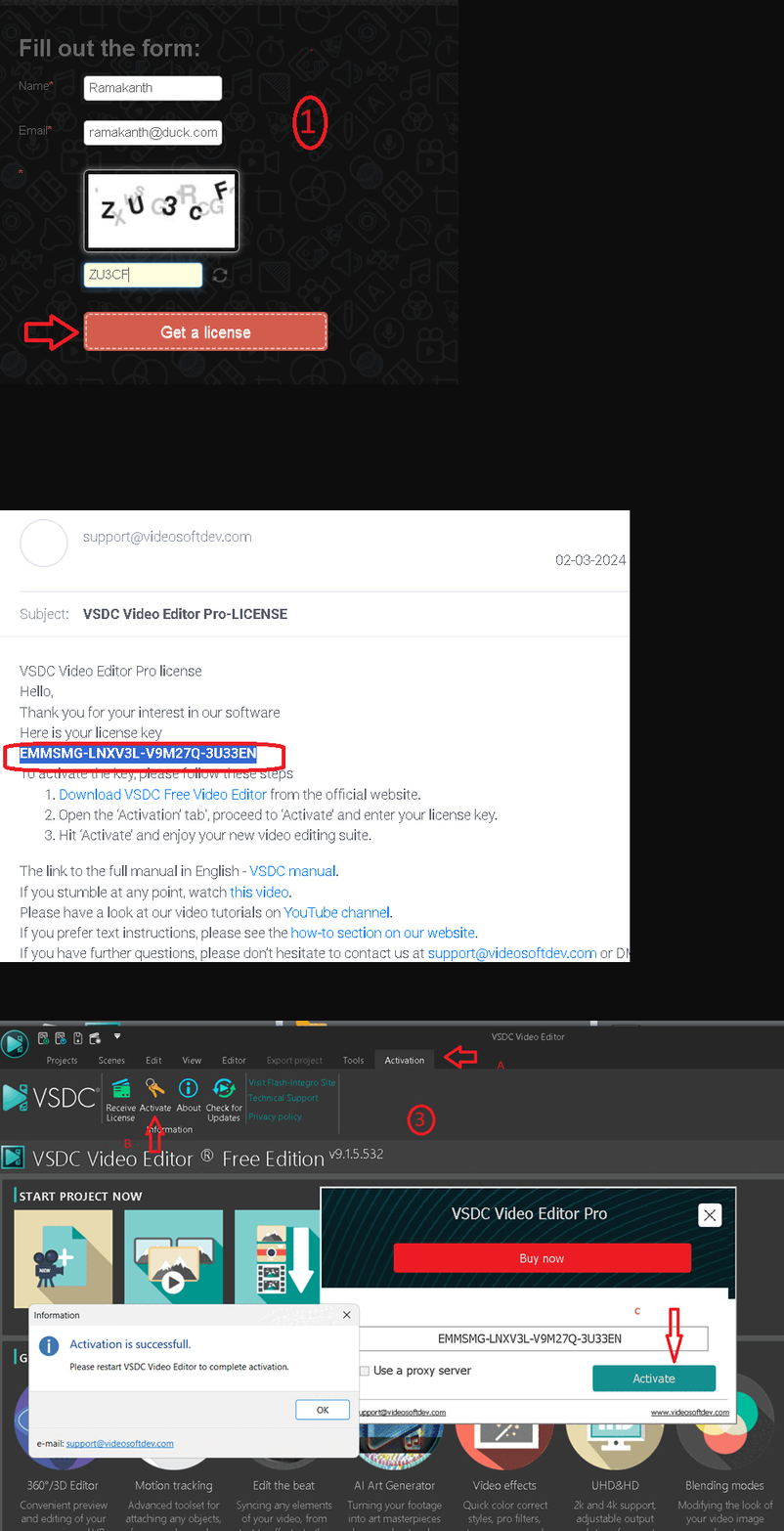
After this, within a few minutes, you will receive an email from VSDC (support@videosoftdev.com) giving you the license code. Check your email inbox.
Download the free version installer of VSDC Video Editor here developer page [64-bit & 32-bit],
Install it and launch the program.
On the main window of the app, click on the “Activation” tab and select the “Activate” option.
Enter the license code you received and press the “Activate” button.
.
[Previous Giveaway]
Free license of VSDC Video Editor Pro v7.2 worth $19.99 for a limited time period.
To obtain your license code, visit this new gift page or this gift page,
Scroll to the bottom of the page. You will get a lighter look.
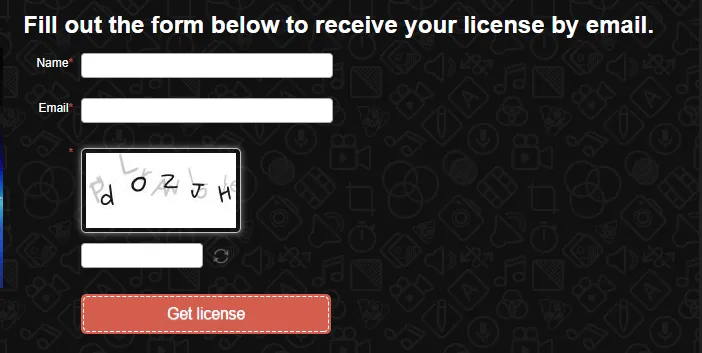
Complete the form by entering your name and email address, filling the captcha and clicking the “Submit” button.
Note: The screenshots below are from the previous promo.
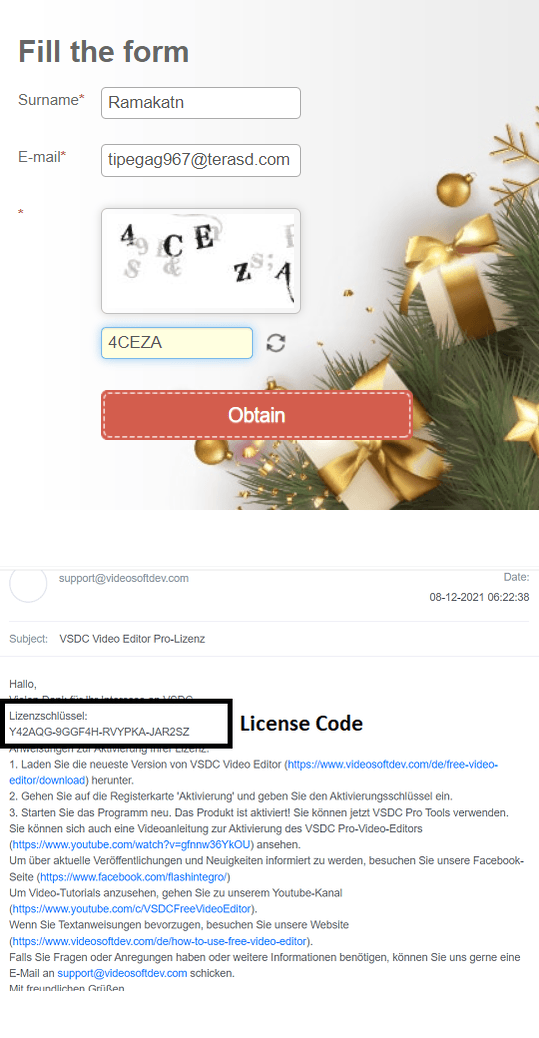
After this, within a few minutes, you will receive an email from VSDC (support@videosoftdev.com) giving you the license code. Check your email inbox.

vsdc@flashintegro.com
vsdc@flashintegro.com


![Wise Registry Cleaner Pro v11 Free for 1 Year [Worth $29.95] | Free Download](https://diystorehouse.com/wp-content/uploads/2024/06/Wise-Registry-Cleaner-Pro-Box.png?v=1719554291)
